

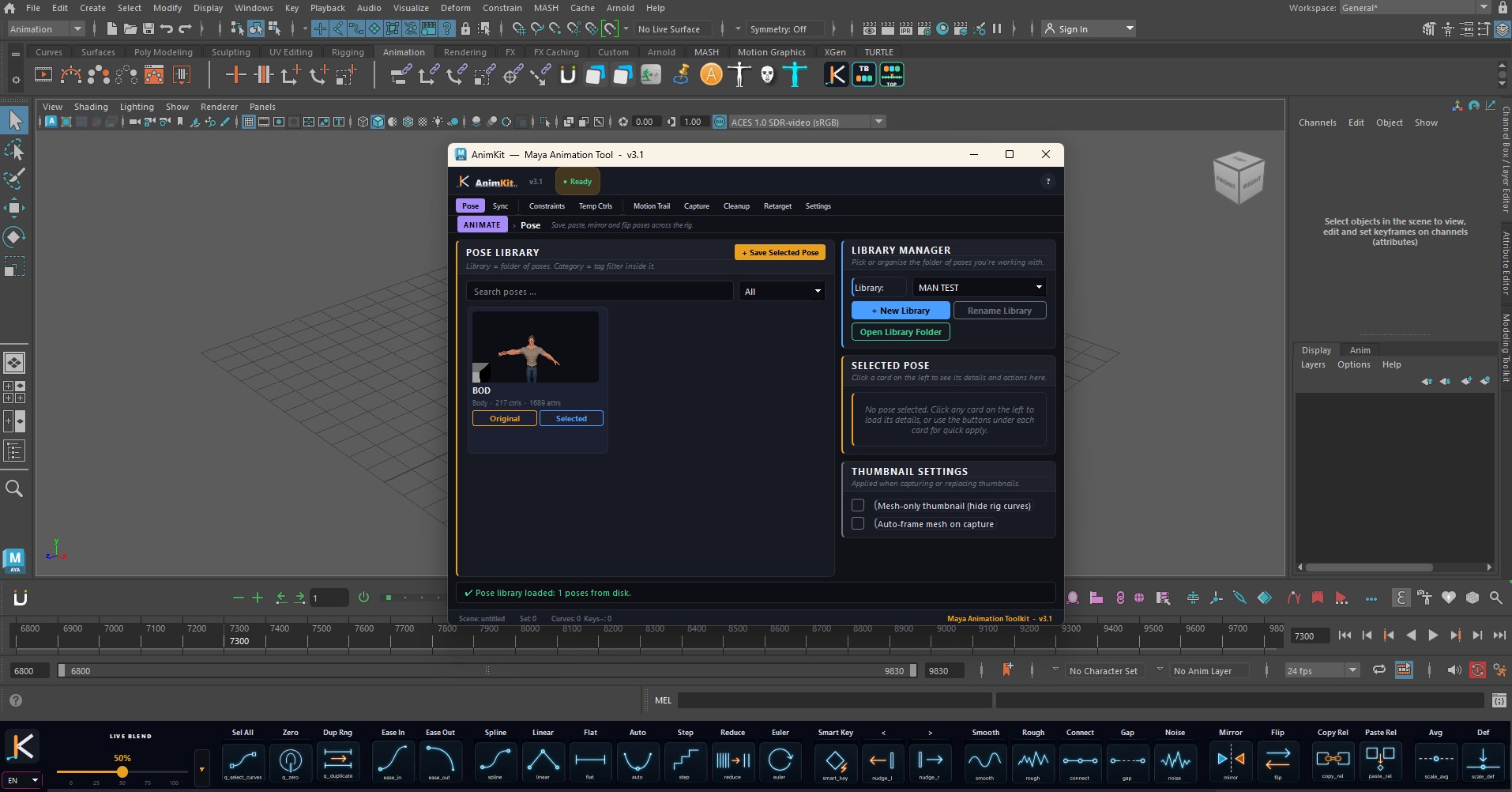
Pose Library
Thumbnail pose cards, folders and subset apply. Mirrors on apply.
AnimKit 3.1Maya 2022–2026 · Windows
An animation plugin for Autodesk Maya: 50+ animator tools and a 31-button toolbar above your time slider. Live tween, mirror, pose library, temp pivot, prop hand-offs and Mixamo retarget, made by a game animator.
Or $9 a month, or $79 once and keep it.
Switch the tangents and press Play: same keys, different life.
F036See it work
Pick a job, then press play.
Drag the Live Blend slider and watch the breakdown update in the viewport. Release, and it commits as one undo step.
Parent, point, orient, scale and aim constraints with offset, plus Attach and Detach at a frame. The keys before the hand-off stay as they were.
Smooth, Rough, Connect to Neighbors, Gap Stitch, Add Noise and Add Wave. They work on what you select and leave hand-tuned keys alone.
Offset each selected object's keys by a set number of frames for an instant cascade: tails, antennas, hair, cloth and crowds.
Capture how one control sits relative to another, then paste that relationship over any frame range. Move a sword between hands without building a single constraint.
F084The toolbar
31 buttons in one dockable strip: Live Blend, ease in and out, tangents, reduce, Euler filter, smart key, smooth and rough, mirror, flip, copy and paste.

F108Everything inside
Each one has a walkthrough video, so you can see exactly how it works before you buy.
Thumbnail pose cards, folders and subset apply. Mirrors on apply.
Finds the mirror axis per control, so L/R poses mirror cleanly on any rig.
Drag to preview a breakdown, release to commit as one undo. Ease in and out buttons.
Type a name and press Enter to save a selection. One dropdown to load or delete.
Time offset, time scale and reverse, plus range-from-selected-keys and handles.
Smooth, Rough, Connect, Gap Stitch, Noise and Wave, without wiping hand-tuned keys.
Push or pull animation around the average, zero, the current frame or a neighbour key.
Offset each object's keys by i × N frames for waves, tails, hair and crowds.
Every constraint type with offset, and prop hand-offs at a frame without pops.
Place a pivot anywhere, drive the control around it, then switch it off.
World Pin for IK feet, Center Root, and custom temp controls that bake back safely.
Capture how two controls sit together and paste it over any frame range.
Mixamo clips onto custom rigs and the UE5 Mannequin, with feet that stay planted.
One-click playblast with sensible quality, format, resolution and audio settings.
Unused influences, history, unknown nodes and scene optimise in one tab.
Also built in: Fake Link (a visual parent without a constraint), Tangents (Spline, Linear, Flat, Auto, Step, Reduce, Euler) and Motion Trail.
Tested on mGear, Advanced Skeleton, HumanIK and custom rigs. Mirror finds the axis per control, so rigs with odd joint orients mirror cleanly. Pose Library, Mirror and Retarget work on referenced rigs with namespaces.
Studio-Library-style thumbnail cards: double-click to apply, right-click to apply to another selection, rename or update. Applies to matching controls only and mirrors on apply.
F132Languages
The whole panel switches language without restarting Maya. Arabic runs fully right to left.
F156Honest comparison
Both are good. Here is who each one suits.
Pro: $144 a year
The established standard, with years of polish and a large community.
Pick it if your studio pays for it and you rely on its deepest tools every day.
$39 a year, or $79 once
The daily tools, plus Mixamo retarget, a thumbnail pose library, per-control mirror and a right-to-left Arabic interface. Windows only.
Pick it if you want the daily tools for much less, or want to own your licence.
Free how-tos and honest comparisons, written from production work.
F180Pricing
Every plan has every tool and the full toolbar. Prices in US dollars; checkout may adjust to your country.
$9/ month
Try every tool for a month. Cancel any time.
Lowest price per month
$39/ year
$3.25 a month, billed once a year. $69 less than paying monthly.
$79once
Pay once and keep it. No renewals.
7-day money-back guarantee. Any plan, any reason: email support@nasrtech.dev within 7 days and you get a full refund. Secure checkout by Gumroad: card or PayPal. Payments by USDT, Vodafone Cash or InstaPay are final and can't be refunded.
Only need the Mixamo retarget? The same retargeting engine is sold on its own. Get MixamoProRetargeter
Bought AnimKit on ArtStation before? Redeem your code
Checkout opens on top of this page. Card or PayPal, or USDT and Egyptian wallets.
The download and your licence file arrive within minutes.
Unzip into your Maya scripts folder and drag install.mel into the viewport. The AnimKit shelf icon appears.
Yes, with the common rig systems: it is tested on mGear, Advanced Skeleton, HumanIK and custom rigs. Mirror finds the axis per control, so custom rigs with unusual joint orients mirror cleanly, and the Pose Library, Mirror and Retarget work on referenced rigs with namespaces.
For the daily tools, yes. AnimKit covers live tweening, tangents, motion trail and pose mirror/flip, and adds Mixamo retarget, a thumbnail pose library and an Arabic and French interface, for $39 a year or $79 once against $144 a year for animBot Pro. animBot is more mature and has a bigger community, so try AnimKit on your own shots: the 7-day money-back guarantee covers that.
AnimKit is $9 a month, $39 a year, or $79 once for a perpetual licence, and every plan has every tool. animBot Pro is $144 a year.
There is no free trial. Every tool has a walkthrough video on this page, the $9 monthly plan lets you use everything for a month and cancel, and every plan has a 7-day money-back guarantee. Want to see your own case first? Email support@nasrtech.dev and I'll send a short demo.
No. AnimKit runs on Windows 10 and 11 only. On a Mac or Linux machine, TheKeyMachine is the free option that runs there.
AnimKit stops opening until you renew. The animation you made with it stays in your Maya scenes.
Yes. The $79 perpetual licence includes every 3.x update, with no renewal.
Each licence is for one workstation. Need more seats or a team quote? Email support@nasrtech.dev.
Not directly. AnimKit has its own Studio-Library-style Pose Library (thumbnail cards, double-click to apply, subset apply, mirror on apply), but it does not read Studio Library files, so you save your poses again inside AnimKit.
Any plan, any reason, within 7 days of purchase: email support@nasrtech.dev with your order and you get a full refund. No forms. The guarantee covers purchases paid through Gumroad (card or PayPal), on the monthly, yearly and perpetual plans. Payments by USDT, Vodafone Cash or InstaPay are final.
No. Your licence is checked on your own computer, so AnimKit works offline and never asks you to sign in inside Maya.
Email support@nasrtech.dev. I usually reply within 24 hours.
50+ tools, one toolbar, every Maya from 2022 to 2026.
7-day money-back guarantee · Questions? support@nasrtech.dev